

Wireshark is a staple of network troubleshooting and verification. When coupled with a Switchport Analyzer (SPAN), remote SPAN (RSPAN), or encapsulated RSPAN (ERSPAN) session, just about any traffic can be analyzed as it traverses the network. The ERSPAN session is extremely useful when trying to troubleshoot an issue, and the chokepoint for traffic monitoring doesn't really allow for the SPAN destination to be locally attached.
The configuration is relatively simple, and it can be configured, saved, and modified once set up. Furthermore, the session can be administratively shutdown in case the troubleshooting needs to happen at another time. Below shows a sample configuration of an ERSPAN session (number 13), monitoring traffic on GigabitEtherent 0/3, and sending it to a remote destination of 192.168.13.13. Furthermore, it is sending a source IP address of 10.13.13.13.
(config)#monitor session 13 type erspan-source
(config-mon-erspan-src)#description WAN_Uplink_1
(config-mon-erspan-src)#source interface Gi0/3
(config-mon-erspan-src)#destination
(config-mon-erspan-src-dst)#erspan-id 13
(config-mon-erspan-src-dst)#ip address 192.168.13.13
(config-mon-erspan-src-dst)#origin ip address 10.13.13.13
(config-mon-erspan-src-dst)#exit
(config-mon-erspan-src)#no shutdown
Once that is done, you can launch Wireshark on your local machine, and use <span class='code'>ip proto == 0x2f</span> in the filter. This will allow Wireshark to only analyze the traffic that is being sent over an ERSPAN session. If you have multiple ERSPANs being sent to this destination, you can further parse the input to include the source address specified, but I try to only have a single ERPSPAN session sending traffic at any one time.
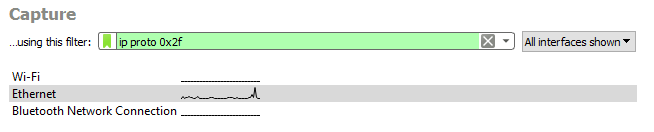
It is important to put the ip proto 0x2f in the filter so that Wireshark will ignore all other packets, and it allows for the real-time filter to be used to get a more granular view of the packet flow. For reference, the hexadecimal 0x2f IP Protocol refers to a decimal IP Protocol of 47, which is GRE. ERSPAN uses GRE to encapsulate the session and send to a remote destination.